
Costs and scope
Kitchen Remodel Costs: Build a Scope-Based Budget
Kitchen budgets change when the layout, cabinetry, appliances and building-service work change. Separate those decisions before comparing proposals, then use the worksheet below to organize actual amounts from your estimates.
Define the kitchen before pricing it
List the room arrangement you plan to retain and the changes you want to explore. Replacing cabinets and surfaces is a different brief from changing the relationship between rooms or moving equipment. Describe the desired use first, then record what needs professional review.
Cabinet quantities, interior fittings, countertop choices, appliances and finish repairs should be visible in the proposed scope. Keep owner-supplied products and work under a separate agreement on their own list so they do not disappear when totals are compared.
Compare allowances with actual selections
A cabinetry allowance does not describe a complete cabinet specification. Ask which schedule, finish and fittings it assumes. Apply the same question to surfaces, appliances and lighting so the amount can be connected to an actual decision.
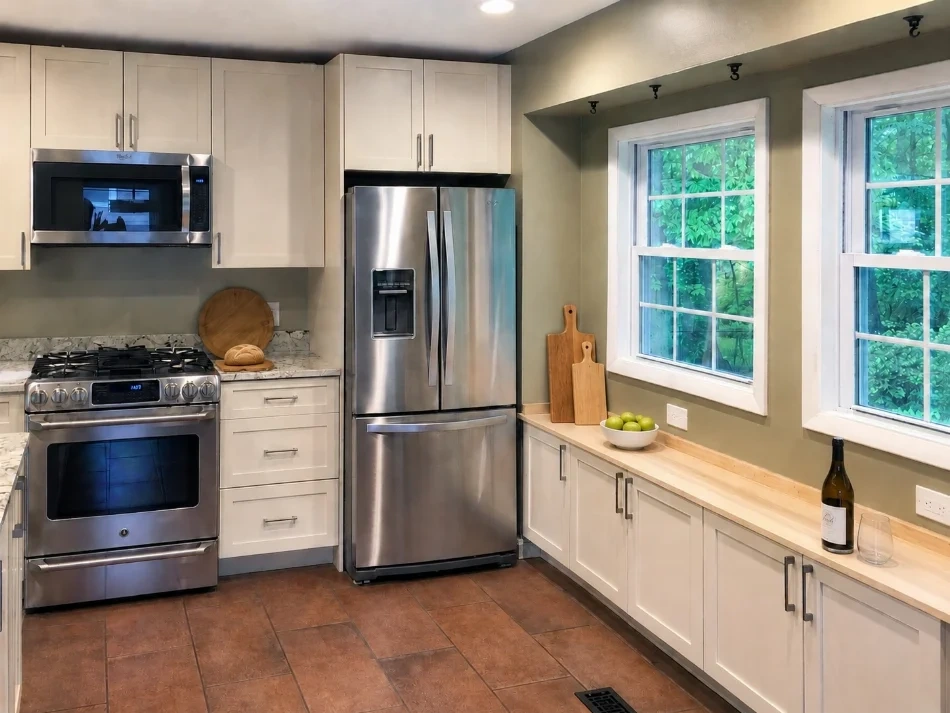
The Springfield kitchen project shows coordinated cabinetry, countertops and window-side storage. It is an example of finished choices, not a price benchmark for your room. A real budget should relate to the dimensions, selections and included work in your proposal.
Make retained and changed layouts comparable
If you are comparing layout options, ask for the assumptions behind each. Identify building-service changes, investigations and repairs beyond the visible kitchen finishes. Do not assume that a proposed wall change or moved fixture is already designed or approved.
Read the retained-versus-changed layout guide before deciding which scope to price. That can prevent a rough budget for one arrangement being carried forward as if it covered a different design.
Use a scope comparison before the calculator
Create one row for each included work category. Write down whether the amount is fixed, an allowance or waiting on information, and identify any owner-supplied items. The worksheet below adds the actual figures you enter; it does not generate a Graves quote or a local market average.
The FTC recommends written estimates that describe the work and materials along with timing and price. Ask for clarification when the scope behind a figure is unclear, and keep the explanation with the proposal.
Source: FTC: reviewing written home-improvement estimates
| Budget item | Record this | Check before relying on it |
|---|---|---|
| Cabinetry and storage | Amount and stated inclusion | Fixed scope, allowance or unresolved? |
| Countertops and backsplash | Amount and stated inclusion | Fixed scope, allowance or unresolved? |
| Appliances and installation | Amount and stated inclusion | Fixed scope, allowance or unresolved? |
| Demolition and finish repairs | Amount and stated inclusion | Fixed scope, allowance or unresolved? |
| Electrical, plumbing and ventilation | Amount and stated inclusion | Fixed scope, allowance or unresolved? |
| Design, permits and coordination | Amount and stated inclusion | Fixed scope, allowance or unresolved? |
Keep changes and exclusions with the total
Identify what the total leaves out and who will supply that work or item. Ask how a changed selection or newly discovered condition would be documented and approved. A comparison is useful only when its assumptions remain visible.
If you choose to include a planning reserve in the worksheet, enter the percentage yourself. It is a calculation aid, not a recommendation that a particular reserve will cover every project risk. Your completed agreement and actual scope remain the basis for the project.
- Compare the same current brief.
- Record specifications and owner-supplied items.
- Label allowances and unresolved amounts.
- Identify exclusions and responsible parties.
- Ask how changes are priced and approved.
- Review the complete written proposal before approval.
Add your estimate amounts
Enter amounts from your proposals. This worksheet calculates your entries; it does not generate a project quotation. Values stay in this page and are not submitted by the worksheet.
No amount is prefilled. Keep exclusions and unresolved items alongside the calculated total.
Common questions
Is this an instant project quotation?
No. The worksheet adds amounts you enter from your estimates. It does not price unmeasured work or create a construction offer.
Does a similar project photograph establish my price?
No. Your property, scope, selections and responsibilities need their own proposal. Project photographs help explain choices, not transfer a customer’s price to another home.
What if part of the amount is still unknown?
Keep it marked as unresolved and ask what information is needed to define it. Do not turn an omitted item into a zero-cost assumption.
Sources
Related reading
Published by Graves Design & Remodeling, Inc. · +17036604554
8346 Traford Ln Suite #7, Springfield, VA 22152